For Officiants

The Chapel at Wimberley Officiant Guide

Everything you need to lead a beautiful ceremony at our chapel — timing, sound, the license, and how to find us. All on one page.

On this page

Planning Ahead

Running your own rehearsal

If you would like to rehearse, we've put together resources here including notes and diagrams to make that easy to do offsite at your hotel or Airbnb. Our Experiences do not include a rehearsal in the chapel. On rare occasions, we may be able to schedule a rehearsal onsite for an additional charge but we could only confirm this when it is two weeks or less from your wedding date. More details are below.

A ceremony rehearsal is really about people and order — and you have two good ways to do it.

Option 1 (plan on this one): run your own, anywhere

Since an onsite slot can't be promised, make this your default. A half hour at your hotel, a living room, or a backyard covers everything — most couples do it the night before, right before the rehearsal dinner.

What to practice

  1. The lineup. Decide the processional order and write it down, so everyone knows when they'll be walking in. Make sure your music lead knows when to change songs.
  2. The walk. Everyone walks slower than feels natural — count two beats per step. Leave space between pairs.
  3. The cues. Your music lead practices the handoffs with the phone that will be used for music: prelude fading out, the processional songs, and the recessional.
  4. The front. Who stands where, who holds the rings, who takes the bouquet, who has the vows.
  5. The exit. The recessional runs in reverse. Don't forget about ringing the bell on your way out!

Helpful chapel facts for your run-through

  • The chapel has a 6' wide center aisle.
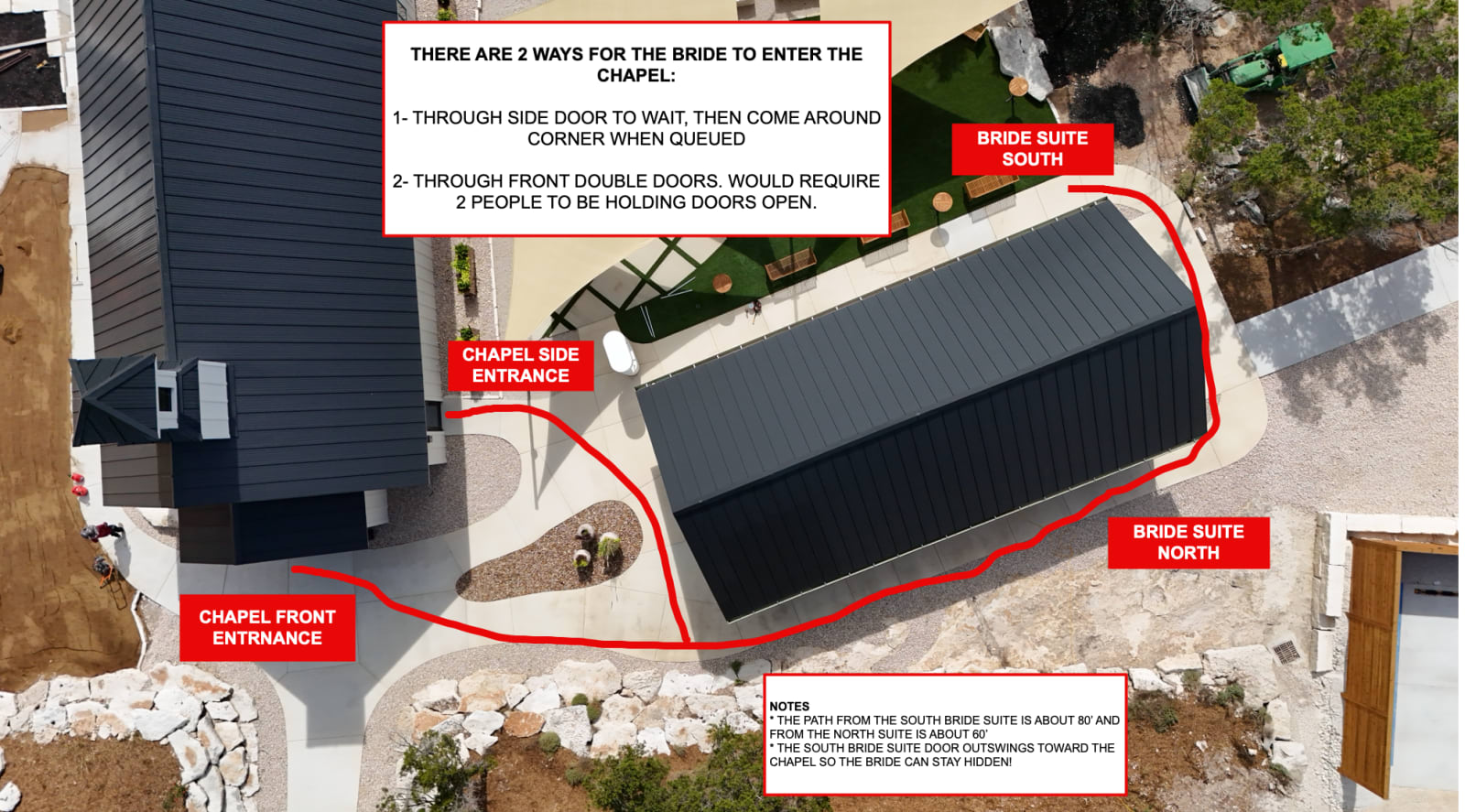
  • It's approximately 60 feet from the North bride suite to the chapel, and about 80 feet from the South suite. The diagram below shows both paths and the two ways in.
  • Plan to ring the bell during your exit from the chapel! Do not slam it or it will be very loud. A slow consistent pull is all it needs.
  • There's no microphone during the ceremony — and none needed; the chapel is intimate enough that everyone hears your vows.
Aerial photo of the chapel and both bride suites with the walking paths drawn in red: about 80 feet from the South suite and about 60 feet from the North suite. Two ways for the bride to enter: through the chapel side entrance to wait and come around the corner on cue, or through the front double doors with two people holding them open. The South suite door swings out toward the chapel so the bride stays hidden.
The walk to the chapel: about 60 feet from the North suite, about 80 feet from the South suite. Two ways in: wait inside the side entrance and come around the corner on cue, or come through the front double doors (two people hold them open). The South suite door swings out toward the chapel, so the bride stays hidden. Tap to open full size.

See Chapel layout & seating for how the room is set, and How music works for the playlist your rehearsal should practice against.

Option 2: a short rehearsal at the chapel

We can host a one-hour rehearsal at the chapel for $200 (one hour is the minimum we schedule), only when the building is free — usually in the day or two before your wedding. Because our calendar fills in around your date, we cannot confirm a rehearsal time more than two weeks out: text us at (830) 402-5690 about two weeks before with a couple of times that could work, and we'll confirm if one is open. Want to see the chapel before then? See Visiting before your wedding.


Planning Ahead

Marriage license & making it legal

Get a Texas marriage license from any county clerk between 90 days and 72 hours before your ceremony, bring it on the day, and your officiant signs it and returns it within 30 days. We don't provide an officiant — a pro or an ordained friend both work.

The license

For a legal marriage ceremony, Texas requires a marriage license issued at least 72 hours before the ceremony. You can get one from any Texas county clerk's office — it doesn't have to be the county where the chapel sits.

Two dates to know:

  • The license is valid for 90 days from the day it's issued. Pick it up in the window between 90 days and 72 hours before your ceremony.
  • Texas waives the 72-hour wait if you've completed the state's free premarital education course (Twogether in Texas) or if one of you is active-duty military — ask the clerk.

Bring the license with you on your wedding day. After the ceremony, your officiant signs it and returns it to the county clerk's office that issued it within 30 days — that's what makes it official. The clerk typically mails your recorded license back to you.

The officiant

The Chapel at Wimberley doesn't provide an officiant, and couples go both ways happily:

  • Hire a professional — you'll find a few we recommend under Preferred Vendors in your Couple's Portal.
  • Ask someone you love — any family member or friend can get ordained online, free, in minutes at American Marriage Ministries. A ceremony led by someone who knows your story is something guests remember.

If your officiant hasn't worked at the chapel before, send them our officiant page — chapeltx.com/guide/officiant — it has everything they need in one place.

Vow renewals

Renewing your vows? No license needed — just the two of you and the words.


Music & Sound

How music works at the chapel

The chapel has a built-in AirPlay sound system — your phone is prepared ahead of time with your playlists. On the day of your wedding, your phone is then used to control the music and volume, and one trusted person (your music lead) runs the whole ceremony's music (even from their seat). Live musicians bring their own amplification.

The chapel's built-in Sonos sound system works over AirPlay on the venue WiFi — any iPhone or iPad becomes the soundboard: connect, press play, and the room fills. One person you trust connects it and runs it from their seat — the WiFi details are on this page, and our team is nearby if they hit a snag. We call that person your music lead.

Pick your music lead

Choose one person — a family member, friend, or coordinator — as your music lead to help run the music that day. Send them their page, chapeltx.com/guide/running-the-music — everything they need in a two-minute read. On the day, their whole job is:

  1. Join the TCW Music WiFi and connect the phone to the chapel speakers over AirPlay (details below — most people are connected in under a minute).
  2. Start your Pre-Ceremony playlist right away — ideally the moment you're connected, so 20–30 minutes of background music is already playing while guests arrive and find their seats.
  3. Play your processional songs as the wedding party enters.
  4. A few minutes before the ceremony ends, check the phone is still connected to the Chapel speakers — phones can drop the connection after the music sits paused for a while, and it's an easy fix if caught before the recessional.
  5. Hit the recessional song as you and your wedding party exit.
  6. Play your After-Ceremony playlist while guests are hanging out.

A nice side effect of AirPlay: once connected, your music lead can run the whole ceremony from their seat — no hovering at the back required.

Chapel WiFi

The sound system lives on the chapel's music network — join it first and the speakers appear in your AirPlay menu:

  • Network: TCW Music
  • Password: chapelmusic

That network is just for the music phone — everyone else joins TCW Guest (no password). Details on the WiFi page.

Build the playlist ahead of time

Make your playlists ahead of time:

  • Pre-Ceremony — 20–30 minutes of background music that starts the moment your music lead connects, while guests arrive and find their seats.
  • Processional — one song, or two if you'd like a separate one for the final walk down the aisle.
  • Recessional — one song for the exit.
  • After-Ceremony — music to keep going while guests hang out on the patio after the recessional. Your music lead can play it on the Patio speakers and the chapel at the same time.

Download them for offline playback the night before and arrive with a charged phone — a fully downloaded playlist can never buffer at the wrong moment.

The best music apps to use are Apple Music or Spotify. Do not use non-music-player apps like YouTube or TikTok as they do not always play over AirPlay. If the song you want isn't on Apple Music or Spotify, the best option is to get the MP3 and use the Wedding Player app — it lets you import MP3 files straight into the app from your Files.

The easy button: Wedding Player + Apple Music

If you want it to be easier for your music lead, there's an app built for exactly this: Wedding Player for iPhone. You line up a song for each moment ahead of time — Pre-Ceremony, processional, recessional — set the fades once, and on the day your music lead just taps when each cue arrives. Pair it with Apple Music to pull in any song you want (a single month's subscription covers the wedding), then download everything so it plays offline. It also comes with a library of ceremony-ready instrumental tracks if you'd rather not pick every song yourself.

If you're hiring live music

Violinists, guitarists, cellists, and other musicians are always welcome — they should bring their own amplification if they want it. The chapel's system is designed for streaming from a device, not as a plug-in PA. Send them our vendor page: chapeltx.com/guide/vendors.

Where they set up: musicians generally play from inside the chapel, at the rear of the ceremony area behind the last row of chairs — the room carries the sound to the front, and they stay out of your photos. If they need a chair, we'll provide one — our ceremony chairs have no arms, so they work for a cellist or guitarist. Just let us know in your questionnaire or when you arrive.

About microphones

During the ceremony, there's no microphone over the chapel speakers — and in our testing, we've found it isn't needed. The room is intimate enough that vows carry to the last row. That goes for readings too.

If you've added our Livestream option, your officiant wears a lapel mic that plays only over the livestream. It picks up your officiant and the two of you during your vows.

For toasts and announcements, like a grand entrance after photos, we have a handheld mic that plays over the Patio speakers. Just ask our staff and we'll get it for you.

Common questions

Where do live musicians set up, and can you provide a chair?

Live musicians usually set up inside the chapel at the rear of the ceremony area, behind the last row of chairs. We'll provide a chair if they need one — our chairs are armless, so they suit a cellist or guitarist. They bring their own amplification if they want it.

Is there someone onsite who can run the music for us?

Our operations person is at the chapel for your entire window, but they're on the venue side — prepping the space, managing any add-ons you've booked, and making sure everything's cleaned up and reset — so they aren't able to run your ceremony music. Your music lead connects with the WiFi details on this page — most people are playing music in under a minute — and our team member is nearby before the ceremony if they hit a snag.

Can the music lead be seated during my ceremony?

Yes — once they're connected, the whole ceremony runs right from their phone, from their seat. They get to watch you get married like everyone else.

Will an iPad work too?

Absolutely — an iPad works exactly the same way: join the chapel WiFi, AirPlay to the speakers, press play. Any Apple device with AirPlay works. Whatever the device, the checklist is the same: playlists downloaded for offline playback, battery charged, and Do Not Disturb on so a call can't interrupt the music mid-ceremony.

Is there internet access onsite?

Yes — the chapel has fiber internet, and joining the WiFi is part of connecting to the sound system. We still recommend downloading your songs for offline playback ahead of time, just in case — a downloaded playlist can never buffer at the wrong moment.

Do we need to bring a speaker for the patio?

No — the patio has its own speakers on the same AirPlay system, so you're covered out there. Once your music lead is connected, they add Patio in the speaker menu and your After-Ceremony playlist plays outside too: a first dance, the toast, or just background music while everyone mingles. For an announcement, ask our staff for the handheld mic.

What is the best app to use for music?

We recommend using dedicated music apps such as Apple Music or Spotify. If you're using an app like Wedding Player, then Apple Music is best. We do not recommend using YouTube or any social media apps like TikTok as they do not play as reliably over AirPlay.


Arrival & Day Of

Directions & arrival

Search "The Chapel at Wimberley" in Google Maps and it routes you straight to us — 644 Ghost Dancer, about 20 minutes from Wimberley. On-site parking is included, and doors open when your window begins. Ask guests to arrive no earlier than 15 minutes before your ceremony.

Finding us

The chapel sits in the Texas Hill Country about 20 minutes from Wimberley, between Austin and San Antonio.

644 Ghost Dancer, Fischer, TX 78623

Searching "The Chapel at Wimberley" in Google Maps routes you right to our door — that's the easiest thing to put on your invitations and share with vendors. Cell service can get spotty in the hills, so have your navigation running before you leave the main roads. For turn-by-turn directions from Austin or San Antonio, see our directions page.

About the last stretch: the final ~1.3 miles to the chapel are a Hill Country dirt road — that's the normal way in, and every car handles it just fine, rain or shine. When the pavement ends, you're almost here; keep following your navigation.

The lay of the land

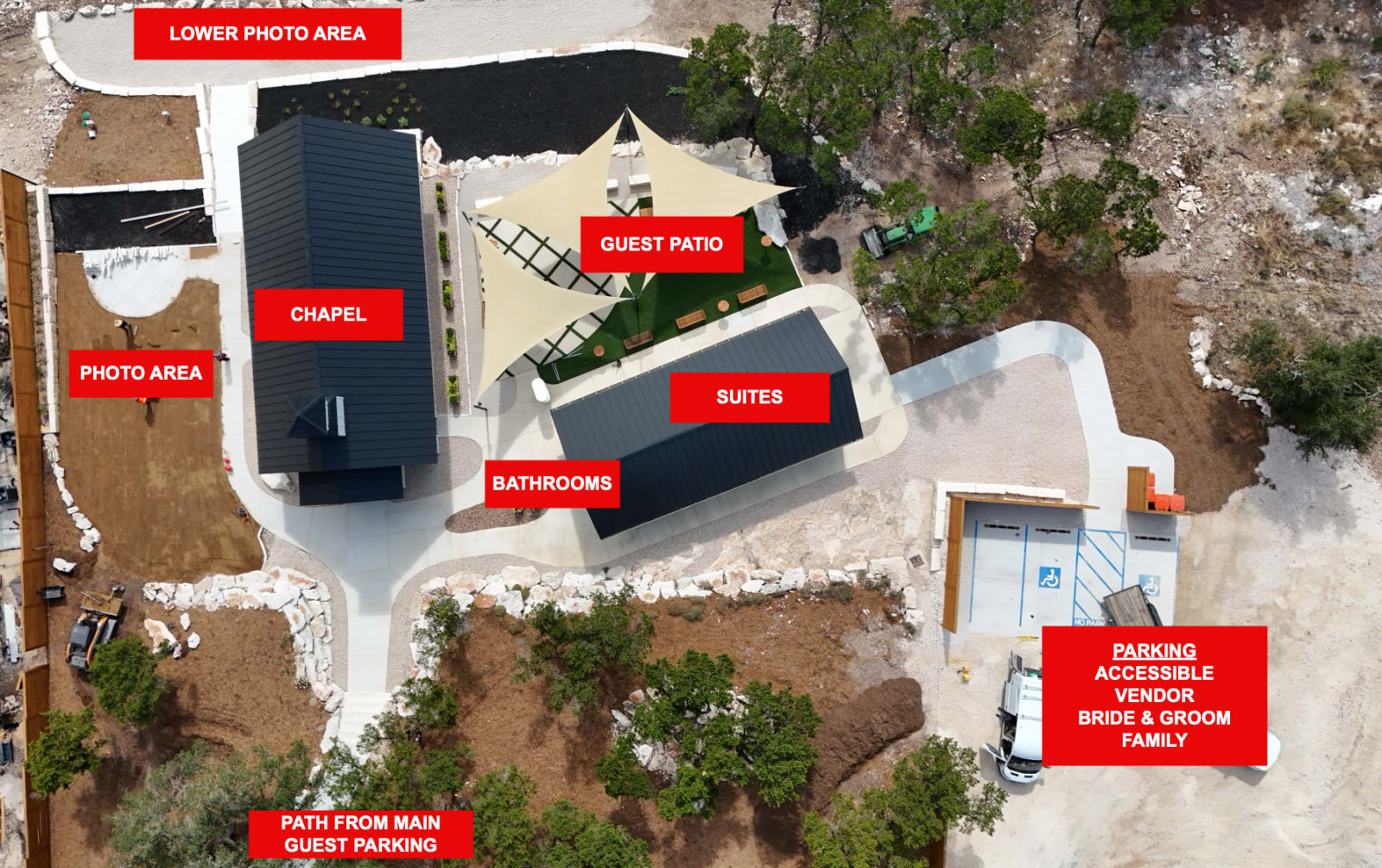
Aerial photo of the chapel grounds with red labels: the chapel, the guest patio under shade sails, the Bride & Groom suites, the bathrooms in the Annex between them, a photo area beside the chapel and a lower photo area beyond it, the path up from the main guest parking at the bottom, and the side parking lot by the suites marked accessible, vendor, bride & groom, and family.
The chapel from above. Main guest parking is just below the frame; the path leads up to the chapel. The side lot by the suites is for accessible parking, vendors, the two of you, and whoever is arriving with you to help set up. The bathrooms are in the Annex between the chapel and the suites. Tap to open full size.

Parking

On-site parking is included for all your guests, steps from the chapel, with accessible parking, a ramp, and an accessible bathroom.

Two lots. Guests park in the main lot and take the short path up to the chapel. The side lot next to the suites is for accessible parking, vendors, the two of you, and family who are arriving with you to help unload and set up. It is a much shorter carry from there, so send anyone bringing decor, cake, or coolers to that lot.

When to arrive

  • You (the couple): the chapel is privately yours from the minute your window opens — walk in at the start. Signature and Premier couples head straight to the suites.
  • Your guests: no earlier than 15 minutes before the ceremony begins. That's plenty of time to park, find a seat, and enjoy the prelude music. Put your ceremony time on your invitations and wedding website, not your window start, and ask guests not to come early. Early arrivals end up waiting outside while you're still getting ready. Running early? Our directions page lists easy nearby stops to pass the time.
  • Your vendors: at the window start, not before — details on the vendor page.

Vendors & Helpers

Vendor arrival & guidelines

Photographers, videographers, officiants, coordinators, florists, and musicians are welcome — arriving when the couple's window opens and wrapping before it closes. Vendors never count toward the guest count.

If a couple sent you this page: welcome — this is everything you need for a smooth day at The Chapel at Wimberley.

Who's welcome

These outside vendors are welcome on the premises:

  • Photographer
  • Videographer
  • Officiant
  • Coordinator
  • Florist
  • Musician (violinist, guitarist, and the like)
  • Food drop-off from a restaurant or caterer (Premier with Grazing Table Setup — cold or room-temperature food, drop-off only)

Any other vendor needs prior written approval from the venue — have your couple text us at (830) 402-5690 before the day.

Timing

The couple has the chapel for a private window, 60 minutes, 90 minutes, or 3.5 hours depending on their experience (their timeline shows how it flows). Vendors arrive when the window opens and depart by the time it closes — load-in, work, and load-out all live inside it. There's no early-access slot, so plan staging accordingly.

Parking

  • Use the side lot next to the suites, not the main guest lot. It is steps from the chapel's side entrance, so load-in is short.
  • The two accessible spaces are in the same lot. Please leave those free.
Aerial photo of the chapel grounds with red labels: the chapel, the guest patio under shade sails, the Bride & Groom suites, the bathrooms in the Annex between them, a photo area beside the chapel and a lower photo area beyond it, the path up from the main guest parking at the bottom, and the side parking lot by the suites marked accessible, vendor, bride & groom, and family.
Where to park and load in. The side lot by the suites, with the chapel's side entrance a few steps away. The left closet for your gear is just inside. Tap to open full size.

How the chapel is set up

The chairs and tables are already in place when the window opens, set to the floor plans on chapel layout & seating:

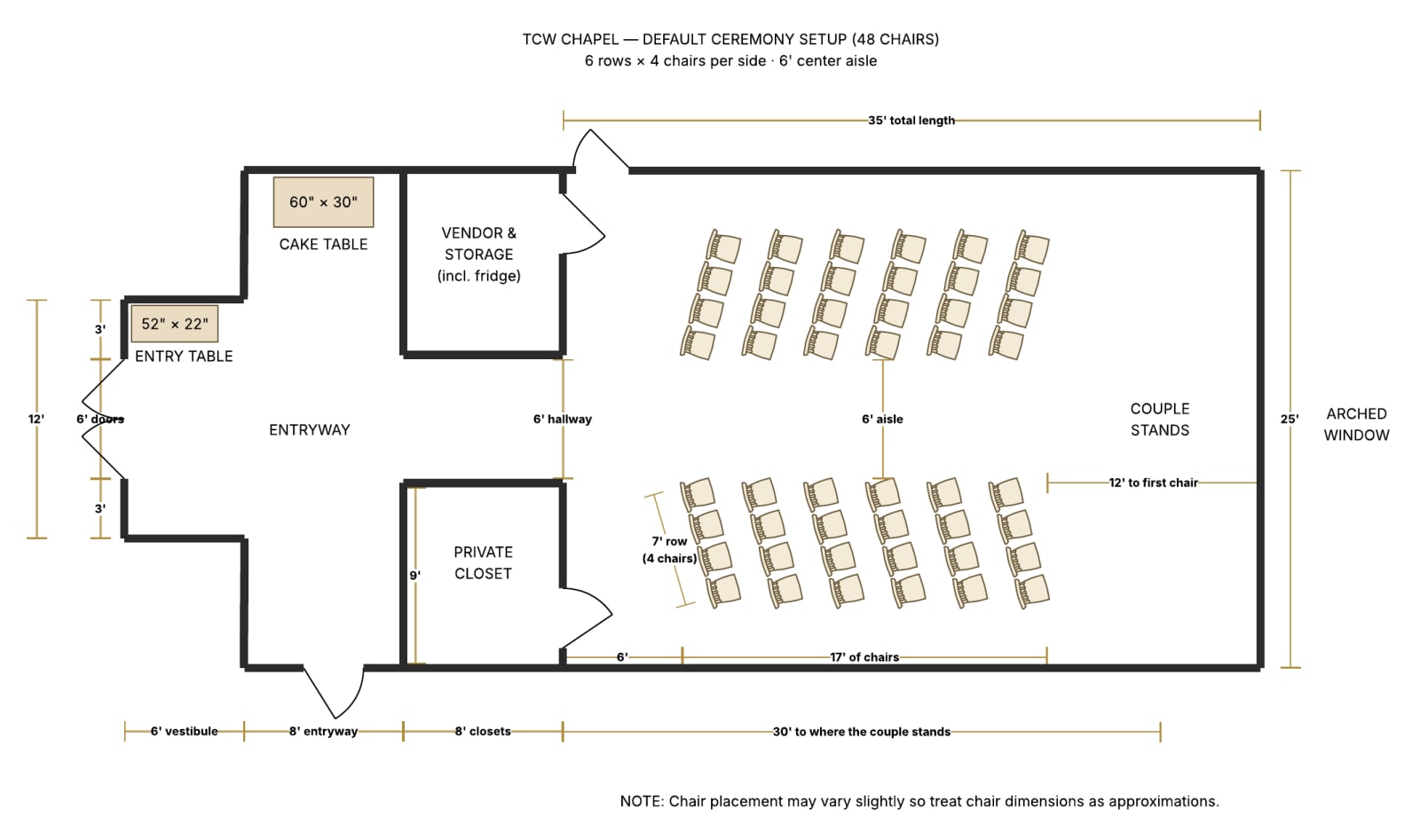
  • 48 chairs by default: 6 rows of 4 on each side of a 6' center aisle.
  • Bigger Premier weddings: a seventh row for 56 guests; seven rows of five, using the space along the walls, for 70. The couple's final count from their Pre-Wedding Questionnaire sets the number.
  • Tables: an entry table (52" × 22") just inside the doors, a cake table (5' × 30"), and a ceremony table (2' × 18") at the front if the couple wants one. The couple decides what goes on each.
To-scale floor plan of the chapel's default ceremony setup: six rows of four chairs on each side of a six-foot center aisle, with the vestibule, entryway, closets and tables
The default 48-chair setup, drawn to scale. The 56- and 70-chair plans, chair sizes and the podium are on chapel layout & seating. Chair placement may vary slightly on the day.

Good to know

  • Inside the chapel, the left closet is for vendors and storage. Any equipment you need to stash away can go in there.
  • Fridge: the left closet also has a full-size refrigerator you're welcome to use — a 20 cu. ft. Frigidaire, fridge only (no freezer), about 33" wide × 72" tall × 30" deep, with four adjustable full-width glass shelves, a bottom basket, and five door bins. Plenty of room for flowers, cake boxes, and food trays.
  • WiFi: join TCW Guest — there's no password. We have fiber internet with good connectivity, and vendors are welcome to use it.
  • You don't count toward the guest count — vendors are working the ceremony, and you're welcome throughout it.

Vendor-specific notes

  • Officiants: a clear acrylic podium is available if you'd like one — no need to arrange it ahead of time. It's floor-standing, 42.3" tall, with a 23.6" × 15.7" tilting top and a front lip so your notes stay put (photo and sizes). It lives in a storage closet at the chapel; just ask when you arrive and we'll grab it.
  • Musicians: bring your own amplification if you want it. The chapel's built-in system streams from a phone over AirPlay; it isn't a plug-in PA. Full details: how music works at the chapel.
  • Florists: decor is ground-level only, nothing attached to the walls, and every install comes back out before the window ends. Full rules: decorating the chapel.
  • Photographers: the chapel is fully enclosed and air-conditioned with an arched window behind the altar; all photos — including grounds — wrap by window close.
  • We do not require a certificate of insurance from you.

Getting here: "The Chapel at Wimberley" in Google Maps routes correctly — directions & arrival.


Vendors & Helpers

WiFi & internet at the chapel

The chapel has fiber internet and WiFi throughout the venue. Everyone joins TCW Guest (no password). Only the phone running the ceremony music joins TCW Music, password chapelmusic.

The chapel runs on fiber internet, with WiFi throughout the venue — the chapel, the patio, and the suites. Two networks, two jobs.

For everyone: TCW Guest

  • Network: TCW Guest
  • Password: none — just join

This is the one for you, your guests, your officiant, your photographer, and your vendors: sharing photos, FaceTiming someone who couldn't make it, uploading, whatever the day calls for.

For the ceremony music: TCW Music

The chapel speakers live on their own network. The phone running your music joins this one so the speakers show up in its AirPlay menu:

  • Network: TCW Music
  • Password: chapelmusic

Only the music phone needs TCW Music — everyone else stays on TCW Guest. The full connect-and-play walkthrough is on your music lead's page: chapeltx.com/guide/running-the-music.

Good to know

  • Even on fiber, download your playlists for offline playback before the day — a downloaded playlist can never buffer at the wrong moment. See how music works.
  • Vendors and photographers are welcome on TCW Guest for uploads and backups during the window. More in vendor arrival & guidelines.
  • Trouble joining? Find our team member at the chapel, or text (830) 402-5690.

Something not answered here?

Sent here by one of our couples? Bookmark this page — it's everything you need for their day at the chapel.